I’ve been using Todoist and Obsidian together for about two years now. Todoist handles my tasks and Obsidian handles my notes. It’s a pretty simple setup, and for the most part it has worked really well.
Recently, I almost tore the whole thing apart trying to make it better.
I used to be really heavy on Notion, and my work still uses it. Over the last couple of years Notion has gotten pretty good. They’ve added a bunch of agentic capabilities, and since most of my notes are already Markdown, I started thinking about how easy it would be to migrate everything over.
The thing that really pulled me in, though, was Notion Calendar.
Notion Calendar is pretty sweet. You can take tasks from Notion and time block them directly onto your calendar. That got me thinking I could finally have the perfect system. Notes, projects, tasks, time blocking, and my calendar all in one place. The one ring to rule them all.
So I started playing around with it.
The problem is that task management in Notion still sucks so bad. Notion isn’t a task manager, and once I started trying to make it behave like one, the whole thing got complicated fast.
I started looking at external tools that could connect Todoist with Notion and went pretty far down that rabbit hole. Spoiler alert: don’t do it. I ended up adding a bunch of tags and other stuff to my tasks, made a mess of Todoist, and eventually had to revert a bunch of it.
After all of that, I came back to a pretty obvious conclusion: my existing setup was already good. I was trying to over-optimize something that didn’t need to be optimized.
What I really wanted wasn’t one application that did everything. I wanted to be able to open a project, see everything going on with it, and see the tasks associated with it.
It turns out I could already do that with Todoist and Obsidian.
Todoist for tasks, Obsidian for projects
Todoist is really good at managing tasks. Obsidian is really good at giving me somewhere flexible to keep everything else about a project.
I’m not going to write all my tasks inside Obsidian and then try to manage them in Todoist too. I would never keep two copies of the same task up to date.
Instead, I use the Todoist Sync plugin by Jamie Byrnes to display my Todoist tasks directly inside an Obsidian project note.
The association between the two is just a Todoist label.
If I have a project with the label garden, for example, I tag the relevant tasks in Todoist with garden. The project note in Obsidian has a Todoist query looking for that same label.
Todoist is still the source of truth for the task. Obsidian is just giving me another view of those tasks alongside everything else I need to know about the project.
How I manage tasks in Todoist
I still do all of my actual task management in Todoist.
For work, I have a Kanban board with sections for Options, Shallow Work, and Deep Work. I’ll sort what I need to work on and move things around depending on where my attention needs to go.
My personal board is simpler. I mainly work from Today and This Week. I also keep a separate backlog where I can bucket things into anytime this year, this month, or scheduled work.
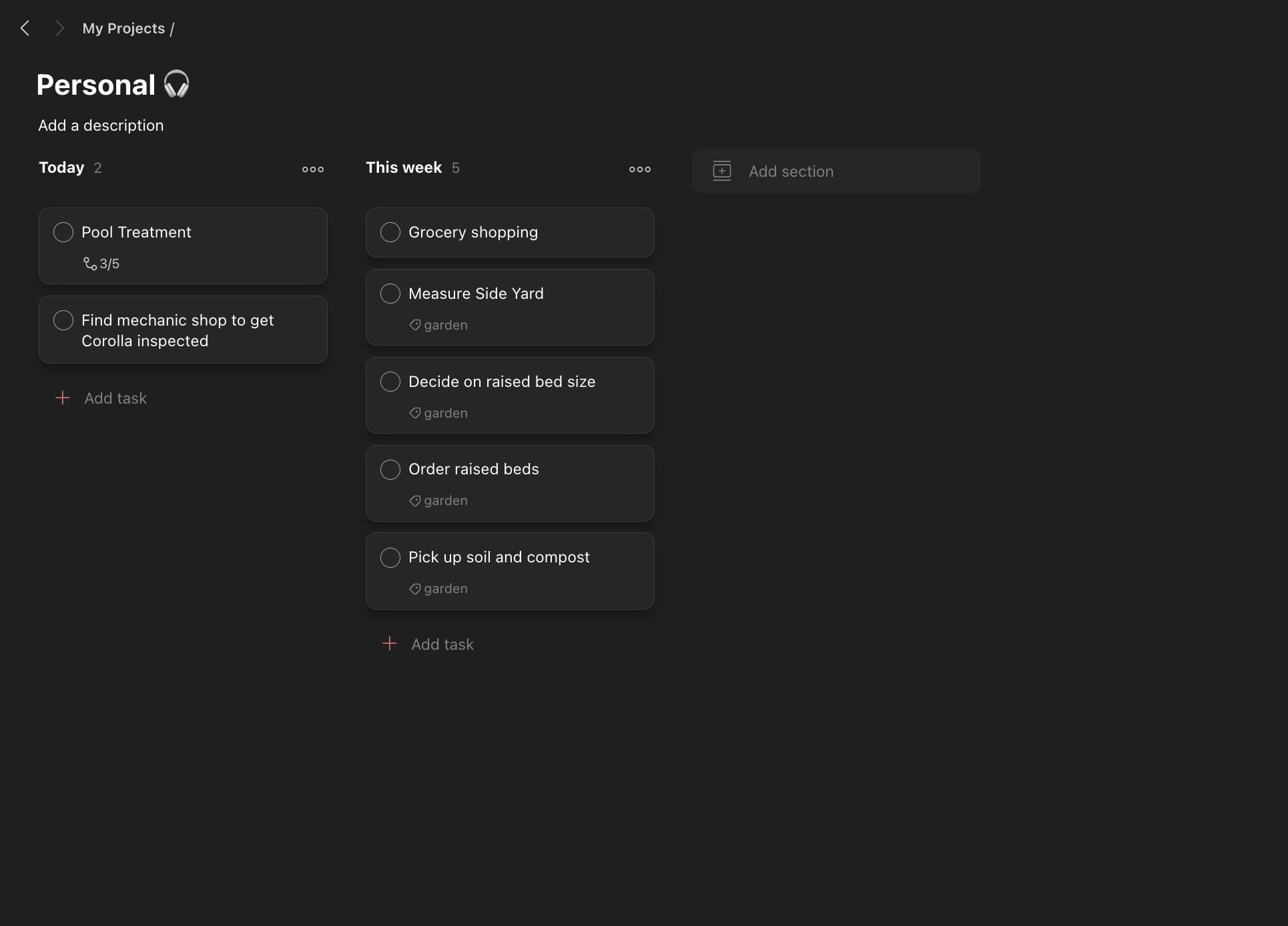
The important part is that I don’t need to think about all of this when I initially capture something.
If I’m on my phone and think of something I need to do, it goes into my Todoist Inbox.
Later, I’ll go through the Inbox and decide whether it was actually something I need to do or just an idea I wanted to capture. If it’s a real task, I’ll move it to the right board, schedule it if necessary, and give it any relevant labels.
That’s where the project labels come in.
For this example, I’m building a small side garden. I’ve tagged each task associated with that project with garden.
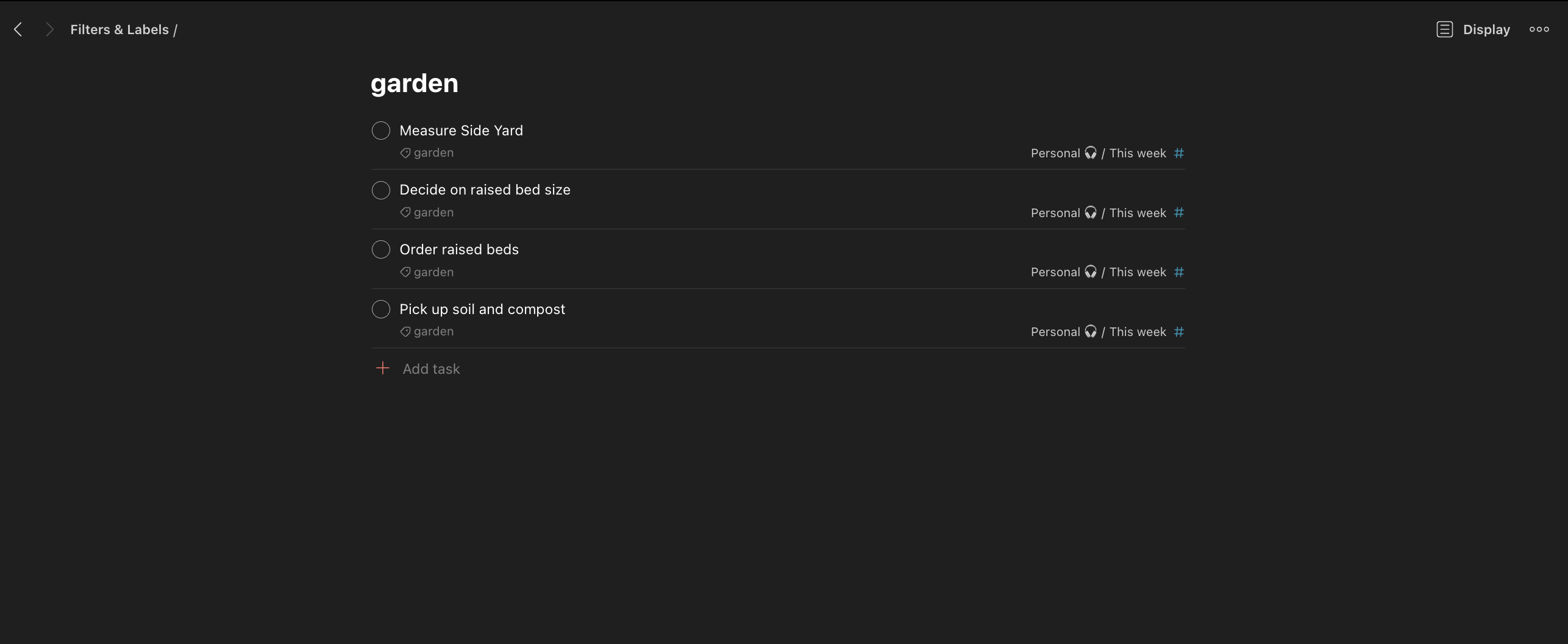
The label is the connection point. I don’t need to build another project structure inside Todoist or duplicate the tasks somewhere else. I can just query that label from Obsidian.
That’s how I prefer to organize it, but a label isn’t the only option. You can also create a dedicated project in Todoist and have Todoist Sync query that project instead. If the Todoist project is called Build a side garden, the filter would look like this:
filter: '#Build\ a\ side\ garden & (due before: +7 days | no date)'The rest of the setup works the same way. Whether you use a label or a Todoist project really comes down to how you prefer to organize your tasks.
A dedicated Todoist project also gives you a convenient place to link back to the matching note in Obsidian. I can add an Open in Obsidian hyperlink to the Todoist project description, use an Obsidian URI as the destination, and jump directly into the note without searching for it:
obsidian://open?vault=VAULT%20NAME&file=Notes%2FBuild%20a%20side%20gardenThe vault name and file path need to be URL encoded, so spaces become %20 and slashes become %2F. That makes the connection work in both directions: the Obsidian note displays the Todoist tasks, and the Todoist project links back to the Obsidian note.
My Obsidian project template
When I start a new project, I create a new note in Obsidian and apply my project template.
Here’s the basic template I use:
---
date:
tags:
  - project
project status:
---

## Overview

What's happening now, one or two lines. Overwrite each week.

**Waiting on:**

---

## Tasks

```todoist
filter: "@LABEL & (due before: +7 days | no date)"
```

---

## Open Questions

- [ ]

---

## Notes

---

## Resources
I replace @LABEL with the Todoist label associated with that project. If I were using a dedicated Todoist project instead, I would replace the filter with the #PROJECT version above.
For the garden example, the query looks for @garden and then shows matching tasks that are either due within the next seven days or don’t have a date.
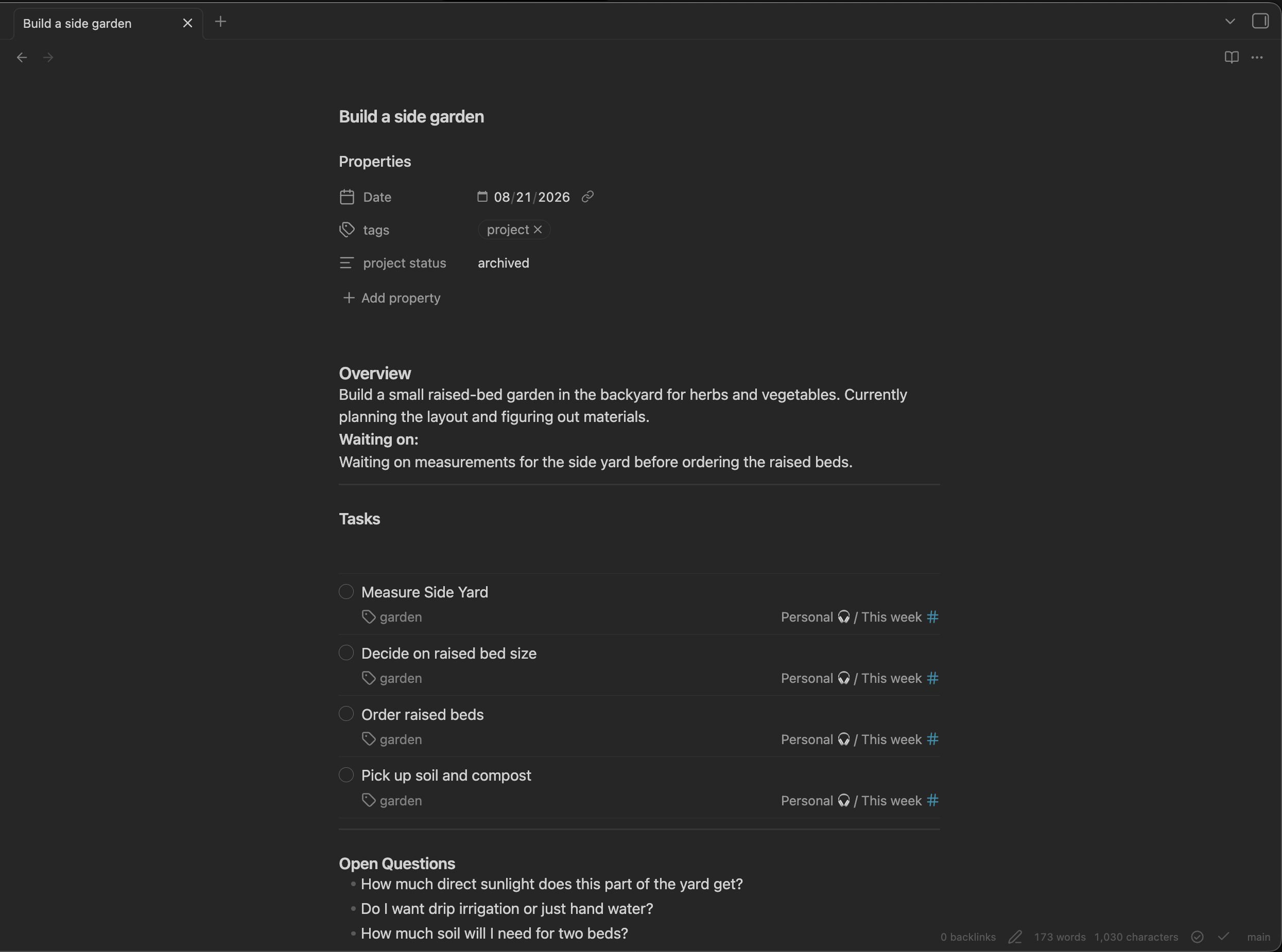
That’s basically all it takes to connect the two.
The project metadata
I keep the metadata pretty simple too.
The project tag tells me what kind of note this is. Since everything in my Obsidian vault is basically just a note, tags are what let me group and view things later.
I also keep a project status property so I can distinguish between things that are active, in progress, archived, or whatever other state makes sense.
That becomes useful when I want to look at all of my projects together in an Obsidian Base.
Current status
At the top I keep a short overview of what the project is, what I’m trying to achieve, and where things currently stand.
This isn’t supposed to be a detailed history of the project. I want to be able to open a note I haven’t looked at in a little while and quickly understand where I left off.
I’ll update it as the project changes so it reflects what’s happening now.
Waiting on
This is where I keep a quick project-level explanation of anything that’s preventing the project from moving forward.
Maybe I’m waiting on a client to send over a file. Maybe a developer needs to give me an access token. Maybe another piece of work needs to happen before I can continue.
I also use a blocked label in Todoist, but that’s slightly different. The Todoist label applies to the individual task that I can’t take action on. The Waiting on section in Obsidian explains the broader state of the project.
For example, a Todoist task might be tagged blocked because I can’t finish an integration yet. In the project note, I might simply write that we’re waiting on API credentials from the development team before the project can continue.
That distinction keeps me from maintaining the same information in two places. Todoist tells me which work is blocked. Obsidian tells me why the project is blocked.
Tasks
This is where Todoist Sync does its thing.
In my setup, the query looks for the Todoist label associated with the project:
filter: "@LABEL & (due before: +7 days | no date)"That gives me matching tasks with that label that are either due within the next seven days or don’t have a date.
If you keep the tasks in their own Todoist project, use the project name instead:
filter: "#PROJECT & (due before: +7 days | no date)"I’m not recreating those tasks in Obsidian. They’re still Todoist tasks. I’m just pulling the relevant ones into the project note so I can see them while I’m looking at everything else.
Open questions
Not everything that comes up during a project is immediately actionable.
I might have questions like:
- What do I need to do to achieve this?
- What are the expected outcomes?
- What am I actually looking for out of this?
- How does this thing work?
Or it could just be some random question that comes up while I’m working.
It doesn’t necessarily need to become a task. I can put it here, keep working, and come back to it when I have an answer.
Notes and resources
Notes are where I keep the running history of the project.
For longer-running projects, I’ll add dated headers and keep adding notes as things happen. It gives me somewhere to keep decisions, conversations, things I’ve learned, and whatever other context accumulates over the life of the project.
Resources are links, documentation, files, or anything else I might need while working on it.
When the project is finished, I mark it as archived.
The notes are still just notes
I keep the rest of my Obsidian vault pretty simple too. Everything basically goes into Notes.
I don’t need a complicated folder hierarchy for every type of thing I save. I use tags to describe what a note is, and then if I care about seeing a particular group of notes together, I can create a Base and filter for that tag.
Projects work the same way.
Each project is still just a Markdown note tagged project. The Base gives me a higher-level view of all of those notes and lets me see things like their project status without changing how the underlying notes are stored.
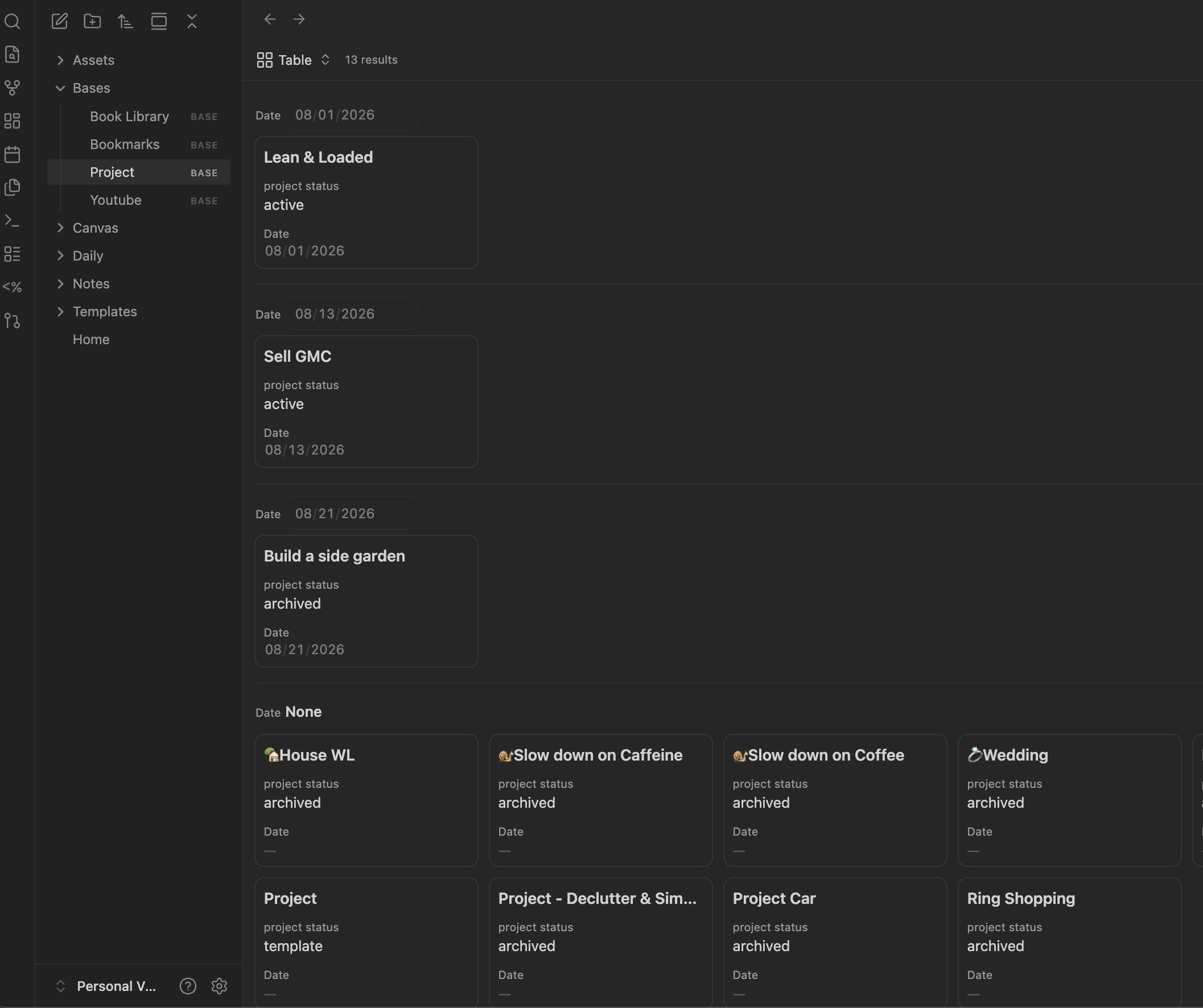
I’ve done the same thing with books and even YouTube videos I save using the Obsidian Web Clipper. The underlying information stays simple, but I can create different views when I actually need them.
That’s one of the things I like so much about Obsidian. I can make it more complicated when there’s a reason to, but it doesn’t force me to start there.
I don’t need one tool to do everything
The whole detour reminded me that every part of my system doesn’t need to live in the same application. I just need the tools I use to share enough context between them.
I already had two tools that were really good at the things I needed them to do.
Todoist is fast. I can pull out my phone, dump something into my Inbox, and move on. When I want more structure, I have Kanban boards, labels, filters, and an API that makes my task data easy to interact with.
Obsidian gives me Markdown, templates, Bases, and the flexibility to structure project information however I want.
Todoist Sync gives me just enough of a bridge between them.
I can open a project in Obsidian and see what it is, where it stands, what I’m waiting on, the questions I still need to answer, my running notes, my resources, and the Todoist tasks associated with it.
Then when it’s time to actually get things done, I go back to Todoist.
I’ve spent a lot of time over the years trying different ways to organize things, and I keep coming back to the same principle: keep the system as simple as possible.
The more friction I add, the less likely I am to use it. I’d rather have a couple of simple tools that are really good at their jobs than spend all my time trying to build the perfect system.